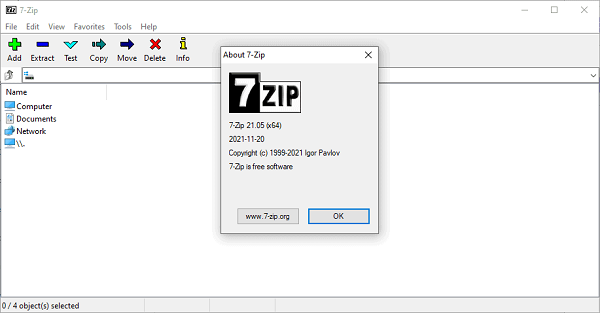
7-Zip 26 Portable for Windows 10 is a free, open-source file archiver and compression utility known for its high compression ratio, versatility, and broad format support.
7-Zip 26 Portable Description
Originally developed by Igor Pavlov and first released in 1999, 7-Zip has become one of the most popular tools for compressing and extracting files on Windows and other platforms where it’s ported. Its combination of powerful features and zero cost makes it a go-to choice for both casual users and IT professionals.
At its core, 7-Zip Download allows you to compress files and folders into archives to save disk space, simplify backups, and make file transfer easier. It also lets you extract files from compressed archives created with a wide variety of formats. What sets 7-Zip apart is its native archive format, 7z, which uses advanced compression algorithms like LZMA and LZMA2 to deliver excellent compression ratios. In many cases, 7z can compress files more efficiently than other common formats, meaning smaller archive sizes without losing data.
Even though 7z is its native format, 7-Zip for Windows 11 supports a broad range of other formats for both packing and unpacking. You can create archives in ZIP and TAR formats, and you can extract files from formats such as RAR, CAB, ISO, GZIP, BZIP2, XZ, WIM, and many more. This extensive compatibility makes 7-Zip a universal tool for handling nearly all common compression tasks you’ll encounter.
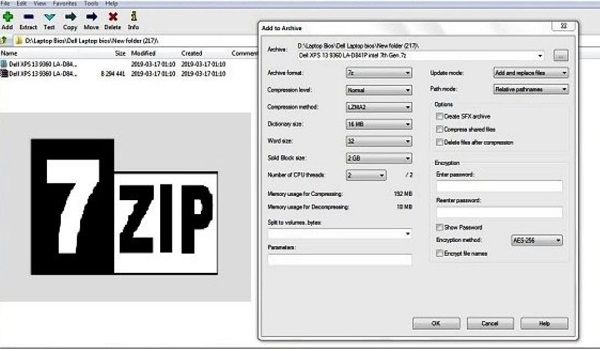
One of the strengths of 7-Zip is its simplicity combined with power. The interface is straightforward: you can select files and choose to compress or extract them with just a few clicks. For advanced users, it offers customizable compression settings — including different compression levels and methods, splitting archives into volumes, and creating self-extracting (SFX) archives that don’t require separate software to unpack. There’s also a powerful command-line version for scripting and automation, which is valuable for system administrators or anyone who wants to integrate compression tasks into batch processes.
7-Zip also includes strong AES-256 encryption for ZIP and 7z archives, helping keep sensitive files secure when stored or shared. With encryption enabled, files inside the archive can only be accessed with the correct password, offering an extra layer of protection for personal or business data.
Features Of 7-Zip 26 Portable
High-Compression Engine
- Native 7z format uses LZMA/LZMA2 algorithms for very high compression ratios
- Often compresses better (smaller file size) than many competitors
Wide Format Support
- Create archives: 7z, ZIP, TAR
- Extract archives: RAR, CAB, ISO, GZIP, BZIP2, XZ, WIM, ARJ, CHM, UDF, LZH, and many others
- Makes 7-Zip a universal tool for virtually all archive formats
Strong Encryption
- AES-256 encryption for 7z and ZIP formats
- Securely protects archived files with a password
- Encryption applies to file contents and headers (optional), hiding file names
Customizable Compression
- Multiple compression levels (e.g., Store, Fastest, Normal, Ultra)
- Adjustable compression settings (dictionary size, word size, solid block size)
- Option to split archives into volumes (for easier storage or transfer).
Self-Extracting Archives (SFX)
- Can create self-extracting .exe files that don’t require external software to open
- Helpful for sharing compressed files with users who don’t have archiving tools
Command-Line Interface
- Full command-line support for automation and scripting
- Ideal for power users, IT administrators, and batch processing
File Manager
- Integrated file browser for navigating archives
- Let’s you view, add, delete, and test files within archives
Fast Performance
- Efficient compression and extraction with minimal impact on system resources
- Works well on older or low-power machines
Context Menu Integration
- Adds useful shortcuts to Windows Explorer
- Right-click files/folders to compress or extract instantly
Unicode Support
-
Handles file names in multiple languages and character sets without errors
Free and Open-Source
- Licensed under the GNU LGPL
- Free for personal and commercial use with no cost or restrictions
Portable Version Available
- Optional portable builds that run without installation
- Great for use on USB drives or multiple computers
Password For File: “123 “