Adobe Substance 3D Painter 11.1 is a powerful software in the field of 3D painting and has capabilities and features that have never been seen before.
Adobe Substance 3D Painter 11.1 Description
This software offers an enhanced work environment compared to its similar counterparts, making it very easy to create textures for 3D assets. Adobe Substance 3D Painter for PC also has a very user-friendly interface that will allow you to create the most creative 3D paintings.
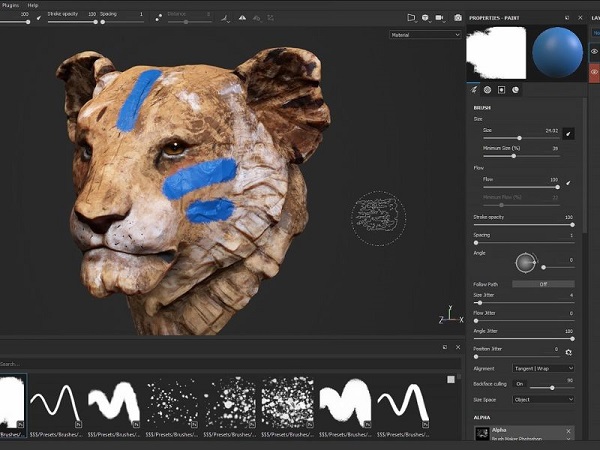
Adobe Substance 3D Painter has entered this field for the first time, introducing features such as Particle Brushes, Material Painting, Substance Brushes, and more, making it possible for game industry artists to create wonderful textures.
Adobe Substance 3D Painter 11 is a professional 3D texturing application used to paint, customize, and finish 3D models with highly detailed materials. It’s widely used in game development, film/VFX, animation, product design, and digital art. Painter lets artists apply materials, colors, effects, and procedural layers directly onto a 3D model in real time, similar to painting on a physical object.
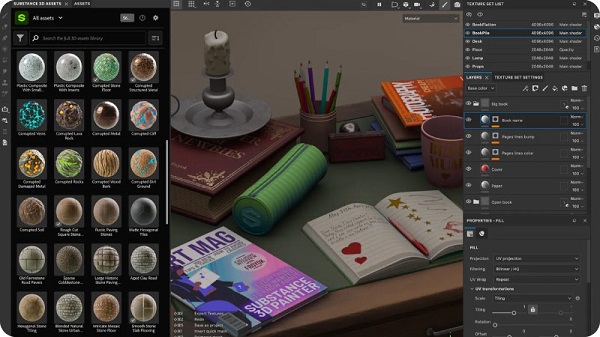
Features for Adobe Substance 3D Painter 11.1

- Real-time 3D painting: Paint directly on the model using brushes, masks, generators, and projection tools.
- Layer-based workflow: Works similarly to Photoshop, with layers, blend modes, masks, and adjustments.
- Procedural texturing: Smart materials and smart masks automatically adapt to your model (edge wear, dirt, scratches, curvature, etc.).
- Advanced material system: Full PBR (Physically Based Rendering) workflow with maps like base color, roughness, metallic, normal, height, emissive, etc.
- Baking tools: Bake high-poly details (normals, AO, curvature, thickness) onto low-poly models for realism.
- Viewport with real-time lighting: See exactly how your materials will look in a game engine or renderer.
- Export presets: One-click exports for Unity, Unreal Engine, V-Ray, Arnold, Blender, and others.
- Integration with Adobe Substance ecosystem: Works seamlessly with Substance Designer, Sampler, Stager, and the Substance 3D Assets library.
Potential Downsides / Considerations:
- Compatibility: Dropping Intel Mac support means that older Macs can no longer run Painter 11. If you’re on legacy hardware, that’s a blocker.
- Experimental features: The automatic cage for baking is marked experimental — may produce sub-optimal results in some cases.
- Learning curve: New tools like Ribbon and filled path have capabilities, but to fully use them effectively might require some ramp-up.
- System requirements: With Vulkan, GPU driver compatibility and stability might be a concern, especially on less common hardware.
- Subscription cost: Depending on how you license (Creative Cloud / Indie / Teams), cost might be a factor — but that’s the trade-off for staying up to date.
System Requirements:
- OS: Windows 7 / 8 / 10 – 64 bit mandatory
- Memory: 8 GB RAM
- Graphics: VRAM 2 GB
- DirectX: Version 10
- Storage: 1 GB available space
- Additional Notes: Integrated GPUs are not recommended
Enter Password For Rar File: “123“