Diffchecker 6.7 is a comparison tool that helps users quickly and visually find and highlight differences between two files or pieces of content, such as text, code, images, PDFs, Word documents, and spreadsheets.
Diffchecker 6.7 Description
Its core purpose is to make it easy to see what’s been added, changed, or removed between two versions of a file. Diffchecker 6 is a versatile diff tool for comparing text, code, images, documents, spreadsheets, and folders. It highlights differences clearly and supports both online and desktop workflows. With additional professional features and team tools, it works well for individuals and organizations that need accurate and efficient comparisons.
The desktop version of DiffChecker has a strong emphasis on security, with all comparisons performed offline on the user’s device, ensuring that sensitive files never leave the device. Diffchecker 6.7 supports comparing a variety of content, including text, images, spreadsheets, and even folders. It also offers features such as AI-powered difference explanation and secure collaboration with end-to-end encryption.
Features Of Diffchecker 6.7
- ✨ File Comparison Tools
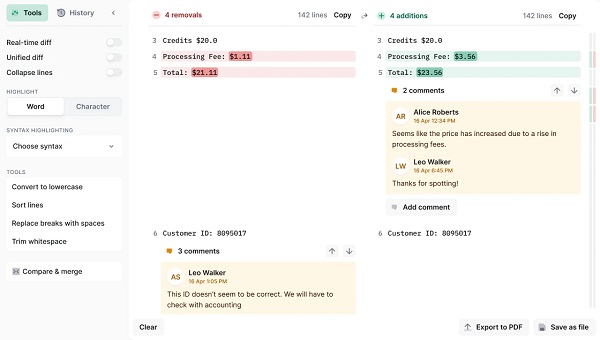
- Text & Code Diff: Compare plain text or source code side-by-side with differences highlighted clearly, making edits easy to spot.
- Image Comparison: Detect visual differences between two images or graphics.
- PDF & Document Diff: Compare PDFs and Word documents by extracting and highlighting textual changes.
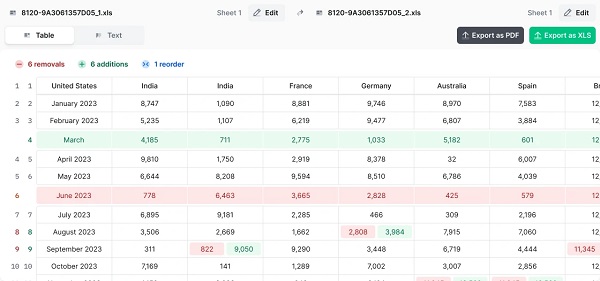
- Spreadsheet Diff: Compare spreadsheets cell-by-cell to spot data changes in Excel/Google Sheets.
- Folder Comparison: See which files have changed or are missing inside folders.
- 👀 User Experience & Editing
- Side-by-Side View: Differences are displayed in a visual, synchronized layout.
- Syntax Highlighting: Supports highlighting for many programming languages.
- Real-Time Diff: Some plans offer immediate updates while editing.
- Export Results: You can often export comparison results, including PDF reports.
- 🔐 Security & Offline Use
- Offline Mode: Available in desktop versions so your files stay private on your device.
- No Ads & Clean Interface: Paid plans remove ads and give a distraction-free experience.
- Advanced & Team Features
- Pro/Desktop and Enterprise Plans: Provide enhanced performance, SSO/SAML security, desktop apps for Windows/Mac/Linux, API access, and team-level integrations.
System requirements to run the program
- Operating System: Windows, macOS, and Linux.
- Requirement: Desktop application requires local installation.
Password: 123