Diffchecker 6.9.2 Portable is an application that can help users find differences and highlight changes made to two files in a fast and convenient manner. It is useful for finding differences between two texts, codes, images, PDFs, Microsoft Word documents, and other files such as spreadsheets.
Diffchecker 6.9.2 Portable Description
The main idea of Diffchecker 6.9.2 Portable is to provide its users with a convenient and easy way to find changes made to two files. The application is an effective and convenient diff checker used for comparing various types of texts and files, including images, codes, documents, and even whole folders. Besides, with some additional professional tools, Diffchecker will be useful for individuals and companies.
One of the most effective tools that can be used to detect differences between text, documents, or code is called Diffchecker. Diffchecker 6.9.2 Portable allows one to highlight any changes that occurred without having to look for them manually. It will provide users with an opportunity to notice the places where something was deleted, added, and modified.
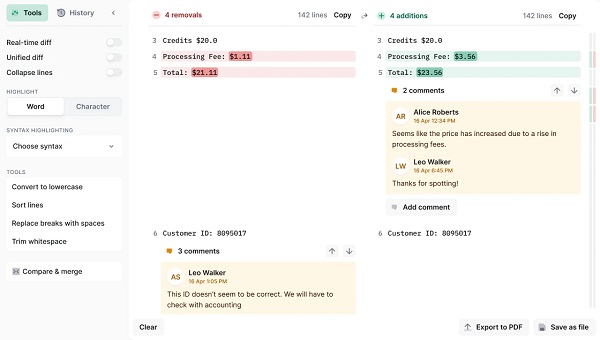
The greatest advantage of using Diffchecker is that all operations performed with this software are very easy and fast. Users do not need to waste time searching for differences between texts since everything is done automatically. What is more, it is necessary to mention that this tool offers people a very user-friendly interface, which does not contain too many elements.
In addition to this, users should know that there is a wide range of file formats, which can be compared using Diffchecker. Apart from the usual texts, people can use PDF documents, code files, and pictures.
Features Of Diffchecker 6.9.2 Portable
- File Comparison Software Solutions
- Plain Text & Source Code Diff: Compare plain text or source code with differences marked out to enable easy identification.
- Image Comparison: Identify differences between images or graphics.
- Diff of PDF & Documents: Extract differences between PDF files or Microsoft Word documents.
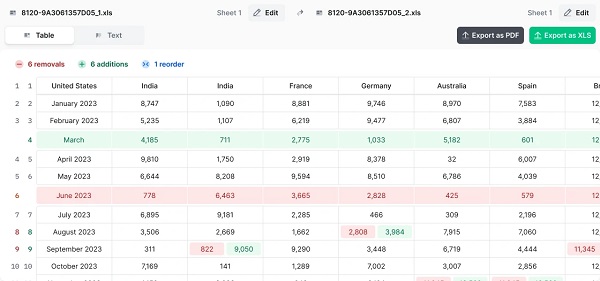
- Spreadsheet Diff: Spot any differences in data through comparison of cells in spreadsheets.
- Folder Comparison: Compare contents in different folders and identify differences among files.
- User Experience and Editing Features
- Dual Side Comparison: Differences are presented in a dual-sided view.
- Syntax Highlighting: Syntax highlighting is available for numerous programming languages.
- Real-time Difference Detection: This feature is present in some plans.
- Result Export: It is possible to export results as PDF documents.
- Privacy and Offline Capabilities
- Offline Access: It is available in a desktop version to ensure your privacy.
- No Ads and Clean Interface: This comes with paid versions.
- Advanced Features for Teams and Professionals
- Professional, Desktop, and Enterprise Versions: Offer advanced capabilities like better performance, single sign-on security, access to desktop applications for multiple operating systems, and more.
System requirements to run the program
- Operating System: Windows, macOS, and Linux.
- Requirement: Desktop application requires local installation.
Password: 123