DP Animation Maker 3.5 Portable (by DesktopPaints LLC) is a tool that lets users turn static images into animated scenes. With it, you can add motion effects (fire, water, fog, lighting, particles, etc.)
DP Animation Maker 3.5 Portable Description
Moving objects (butterflies, fish, rain, snow, etc.), animated brushes, and more are added to still photos to create video loops, GIFs, or animated backgrounds. It’s designed to be user-friendly: you don’t need advanced animation or video editing experience.
Using DP Animation Maker, you can bring natural scenes to life and animate people and objects. DP Animation Maker Portable, which is very enjoyable to use, has a variety of applications and allows users to create animated videos for various purposes. Among the popular products that people produce with DP Animation Maker Software for personal or commercial use are animated videos, web banners, YouTube videos, digital greeting cards, mobile wallpapers, PowerPoint presentations, music videos, and many more.
Limitations / Things to Watch Out For
- Limited timeline / frame-by-frame control — not for high-precision animation where you want full control of motion over time in detailed sequences.
- Export/resolution issues — some users report problems with very high resolution exports, or errors/unreadable files when using custom/resolution settings.
- Transparency/mask issues — opacity, alpha masks sometimes behave imperfectly, especially when exporting to some formats or with complex brushes.
- Animation quality vs file size — for example, GIFs with effects can become very large files or lose quality with high compression.
- Crashes with heavy effect combinations are reported by some users.
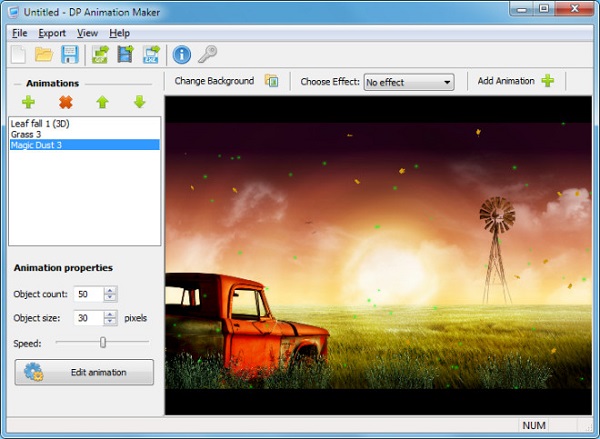
Features Of DP Animation Maker 3.5 Portable
| Feature | Description |
|---|---|
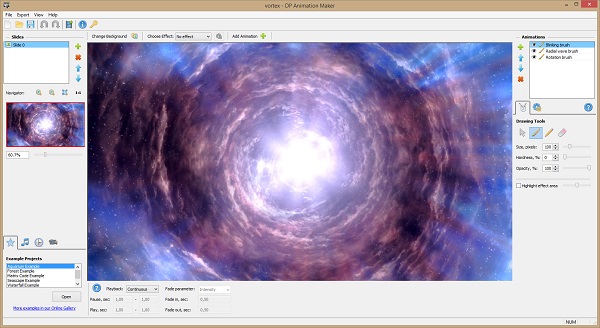
| Animated Effects & Brushes | Tools like smart animation brushes (fire, water, light effects), deformation or morphing brushes, etc., are used to animate parts of the image. |
| Ready-to-Use Moving Objects & Elements | Lots of objects in the library—nature elements (butterflies, fish, grass, etc.), special effects (sparkles, fog, smoke, etc.) that you can place into scenes. |
| Layered Animation | You can use multiple layers/effects/objects, set motion boundaries, adjust timing, etc., to make complex dynamic scenes. |
| Camera & Scene Adjustments | Adjustments like zoom, camera movement, speed, etc., are made to make the animation more dynamic. |
| Multiple Export Formats | GIF, AVI, MOV, MP4, PNG sequence, etc. Appropriate for web, backgrounds, presentations, etc. |
| Looping / Seamless Animation | Options to create looped video animations automatically so that the start and end connect smoothly. |
| Prebuilt Templates / Sample Projects | Comes with sample scenes & templates to help beginners understand how things work. |
Strengths (What It’s Good At)
- Easy to use, even for non-animators or beginners. You can get good results with minimal effort.
- Lots of effects & variety — water, fire, fog, particles, etc., plus moving/stationary objects make it easy to add life to photos.
- Flexible export options so you can use the results in videos, web, slideshows, etc.
- Templates/sample projects help with learning and inspiration.
Password for file: “123“