FontBase Awesome 2.23.1 V2025 is a next-generation font manager built by designers for designers. It understands your needs and provides a great set of features to help you find the right font.
FontBase Awesome 2.23.1 Description
FontBase 2.23 is a solid font manager with many free tools that help organize, preview, activate fonts, manage collections, integrate Google Fonts, etc. Download FontBase Awesome adds premium features (auto-activation, advanced search, glyph access, syncing, UI themes) that help streamline a designer’s workflow, especially when dealing with many fonts, multiple computers, or special typography needs.
What is FontBase
First, a quick summary of FontBase itself:
- FontBase is a font management application (for designers/typographers) that runs on Windows, macOS, and Linux.
- The goal is to help manage large font libraries, activate/deactivate fonts so that your system and design apps aren’t overloaded, preview fonts easily, organize them (collections, folders, etc.), and integrate with Google Fonts.
- There is a free version with many basic features.
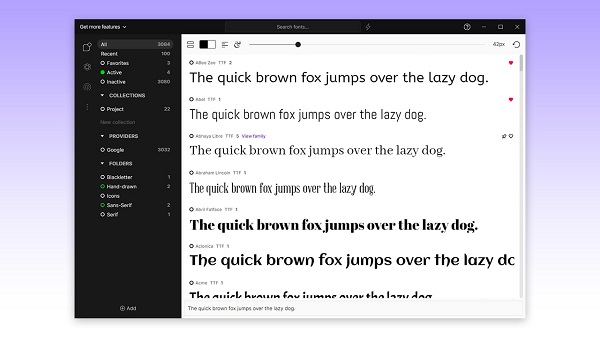
Features Of FontBase Awesome 2.23.1
- OpenType Features: The largest collection of OpenType features in font software, easily accessible to you.
- Glyphs: View and copy every glyph for every language and font in your collection (limited access).
- Styling: Adjust the color, background, text alignment, font size, and line height for your fonts.
- Search: Super-fast one-click search for fonts, even in the largest libraries with thousands of files.
- Google Fonts: Use any font in the Google library with just one click! As if it were locally on your system.
- Experiment: Play around with styling elements like H1 and H2 in the Preview tab.
- Specimen Page: View all the styles of a font on a single page, explore combinations and weights. Glyphs are also visible here.
What is “Awesome” in FontBase
“Awesome” is the premium subscription/upgrade to the free FontBase version. It adds more power-user / convenience features.
Key Features of FontBase Awesome
Here are what you get when you subscribe to the Awesome plan.
| Feature | What it does / Why it’s useful |
|---|---|
| Auto-Activation | Automatically activates missing fonts in Adobe CC apps (Photoshop, Illustrator, InDesign) when you open files that refer to those fonts. Saves time and avoids manual activation. |
| Glyphs+ | View and copy any glyph from any font in your collection (including non-Latin scripts). Handy for special characters or multilingual typography. |
| Tags | Add/manage your own tags for fonts; search via tags. Community-curated tags are also available. Helps organize large font libraries by style, usage, etc. |
| SuperSearch | Search fonts not just by name, but by font properties that designers care about: contrast, weight, proportions, x-height, etc. |
| Playground+ | More advanced preview / “playground” tools: e.g. better export of CSS for web preview or web usage. |
| Collection Sync | Sync your font collections (your organization of fonts) across multiple computers via cloud drives (Dropbox, Google Drive, etc). |
| Multiple Views | Different ways to view your font library: grid view, list view, more compact previews, etc. Helps when you have many fonts and want to browse quickly. |
| Themes (Light/Dark/Classic) | UI themes (light, dark, classic) to adjust to your visual preference or working conditions. |
Pros (Advantages)
Here are things people seem to like about FontBase Awesome:
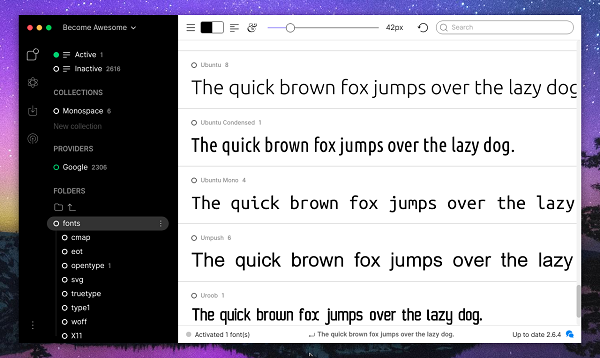
- Very clean, attractive UI; responsive and relatively lightweight compared to some older font managers.
- Makes handling large font libraries easier: organizing, previewing, activating/deactivating. Helps reduce clutter in design apps.
- Useful advanced search (SuperSearch) and glyph tools help designers who need more than just “see font → pick font.”
- Syncing font collections across devices can be a big help for folks who work on multiple machines.
Password for file: “123“