HFS HTTP File Server V3, originally developed by Massimo Melina (aka “rejetto”). It is a lightweight server software designed primarily for file sharing via HTTP rather than via traditional file-sharing protocols.
HFS HTTP File Server Version 3 Description
The “V3” (version 3) represents a major rewrite of the previous HFS versions, with a modernized codebase and revamped architecture. The official website states: “HFS HTTP File Server Version 3 is a full rewrite of the Delphi version.” In essence, you run HFS on your computer (or server), select files/folders to share, and others can connect via a browser to download/upload as configured.
HFS http file server download is a solid, lightweight tool for what it was designed: easy HTTP file sharing, especially for local or semi-private usage. If your goal is to share files efficiently without over-engineering the setup, it works very well. However, if you intend to use it as a critical production server, especially exposed to the internet, you should carefully evaluate security, ensure you use the latest version, and consider whether a more robust file-serving platform is more appropriate.
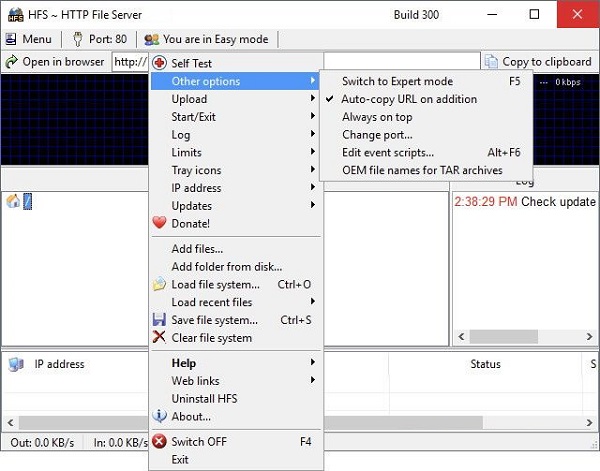
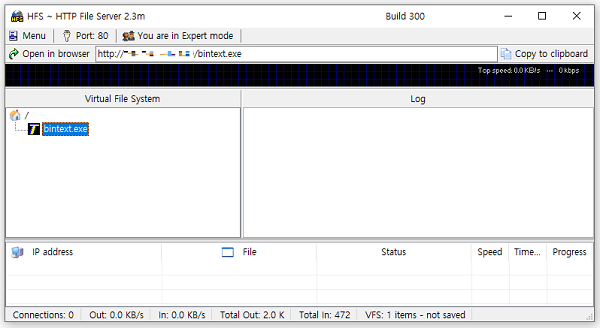
If you want to upload new files, simply drag and drop them into the main window of the tool. Alternatively, right-clicking in the left panel also allows you to share an entire folder, whether virtual or real. The interface comes in two different modes: “Expert” and “Easy,” the former of which not only provides a detailed graph for tracking server traffic, but also displays several statistics such as the number of connections and upload/download speed.
Features Of HFS HTTP File Server Version 3
- Virtual File System: You can share files and folders without copying them into a specific “server” directory; the original structure can be preserved and a virtual view presented.
- Browser-based Access: Users access the shared files via a web browser (HTTP/HTTPS) — no special client required.
- Drag-&-Drop Setup: Many sources highlight how easy it is to “drag files/folders to share” and get a link quickly.
- Portability: HFS runs as an executable, often without a complex install requirement, making it convenient for quick setups.
- User Management & Access Control: You can create accounts, restrict which folders/files users can see, and manage uploads (if enabled).
- Built-in Monitoring & Logging: Real-time stats on connections/downloads, logging of requests.
- Bandwidth/Speed Control: Some versions support throttling or limiting bandwidth per file or overall.
- Flexible deployment: Although originally Windows-only, the GitHub version shows cross‐platform ambitions; V3 is a rewrite in a modern framework.
System Requirements:
Windows 8.1, Windows Server 2012 R2, or later Windows versions like Windows 10/Server 2019.
Installation Guide and Tips:
The software is active and does not require cracking.
Password for file: “123“