Office Timeline Pro+ 12 is a premium PowerPoint add-in designed for professionals who need to create visually impressive, data-driven timelines, Gantt charts, and roadmaps directly within Microsoft PowerPoint.
Office Timeline Pro+ 12 Description
It is part of the Office Timeline product line and builds on the features of the Basic and Pro versions, offering more power, automation, and customization. Office Timeline Pro+ is a premium add-in for Microsoft PowerPoint that enables users to create visually compelling and professional timelines, Gantt charts, and roadmaps directly within PowerPoint. It’s especially popular among project managers, consultants, executives, and teams who need to present project data in a clear, stylish, and executive-friendly format.
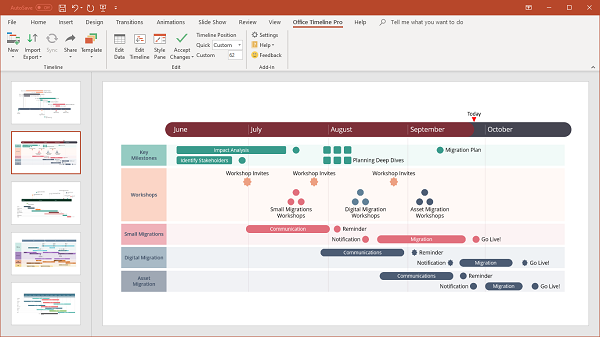
Office Timeline is a software add-in/plugin developed by Office Timeline (the company) that integrates with Microsoft PowerPoint (Windows) and also has a cloud/browser version. It enables users to create professional-looking timelines, Gantt charts, swimlane diagrams, and roadmaps that are presentation-ready. The Pro+ edition (sometimes labelled “Plus”) is a mid-to-advanced tier version of the add-in aimed at project managers, program leads, and those creating executive-level visuals.
Office Timeline Pro+ 12 is a well-designed, niche tool that delivers strong value for the specific task of creating professional-grade timeline visuals in PowerPoint. If your workflow involves preparing frequent program-roadmap slides, multi-stream project timelines, or stakeholder updates, this add-in can save significant time and elevate the presentation quality. However, if your timeline needs are occasional, simple, or if you already use a full PM tool with built-in visuals, then the cost/complexity may not be justified.
Features Of Office Timeline Pro+ 12
- Timeline / Gantt Chart Creation in PowerPoint: You can build timelines and Gantt visuals directly inside PowerPoint via the add-in ribbon, using familiar slide workflow.
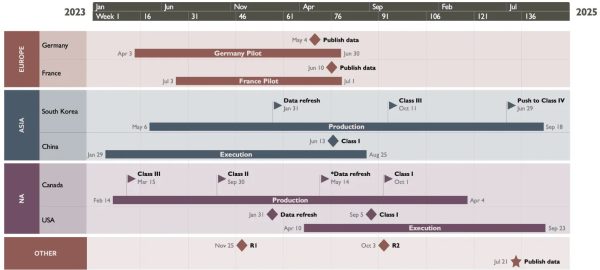
- Swimlanes & Sub-Swimlanes: Pro+ supports multiple swimlane layers (e.g., different workstreams) and sub-swimlanes (nested lanes) for more complex project visuals.
- Multi‐Scale Time Bands: The ability to show multiple time scales (e.g., years, quarters, months) on the same timeline to give context.
- Import & Sync Data: You can import data from Excel and other sources, then update the slide when the data changes.
- Custom Themes & Styling: Change colours, fonts, shapes, and apply custom themes so the visual fits your brand or presentation style.
- Dependencies & Critical Path (in some versions): Pro+ supports showing task dependencies and highlighting the critical path in the timeline.
System requirements:
- Microsoft Windows Vista, Windows 7 (SP1), Windows 8, or Windows 10 (LTSB, CBB, and CB). Office Timeline does not run on Windows 10 S. The add-in is functional on Windows XP and Windows Server, but unsupported.
- .NET Framework 4.5.2 or greater.
- .NET Programmability Support for PowerPoint is enabled in Microsoft Office. .NET Programmability Support is typically enabled by default on Office installations.
- Starting with Office Timeline version 3.17, users do not need to have Microsoft Project installed in order to import Project data into the PowerPoint add-in.
Password for file: “123“