Silhouette Studio is software used to design and send cut jobs to Silhouette cutting machines (Cameo, Portrait, Curio, etc.). There are multiple versions (editions) of the software: Basic Edition (free), Designer Edition, Designer Edition Plus, and Business Edition.
Silhouette Studio Business Edition 5.0 Description
Business Edition is the highest-tier paid upgrade, intended for small business users or power users who need advanced tools and features to improve efficiency, reduce waste, handle larger or higher-volume production, and support more file formats.
In short, Silhouette Studio Business Edition is a premium upgrade of Silhouette’s design & cutting software aimed at users who need more than just basic crafting. It brings powerful tools to streamline workflows, reduce waste, support more file formats, handle higher volume, and better manage designs across multiple machines.
If your usage is occasional and simple, Basic or Designer may be enough; but if you plan serious production or sharing/design collaboration, Business Edition offers a lot of value.
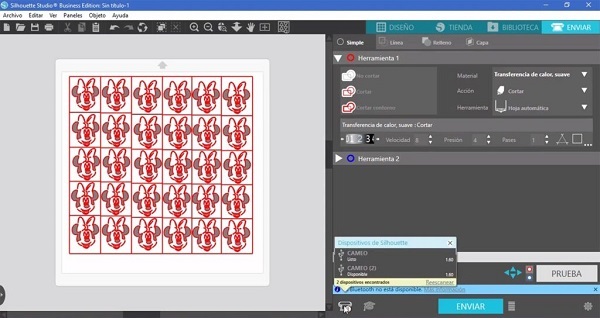
Features Of Silhouette Studio Business Edition 5.0
| Feature | What It Allows / Why It’s Useful |
|---|---|
| Multi-Cutter Support | Control multiple Silhouette machines connected to the same computer. Good for scaling up production. |
| Import “Pro” File Types (AI, EPS, CDR) | You can open Adobe Illustrator (AI), EPS, and CorelDRAW (CDR) files directly. Useful if you work with external vector art or receive files from graphic designers. |
| Export to SVG, PDF, JPG | When sharing designs, using them in other software, or providing ready-to-use files for customers. |
| Automated Weed Lines | Automatically create lines in vinyl (or other materials) you can use to peel away (“weed”) unwanted material more easily. Saves time and improves accuracy. |
| Matrix Copy | Duplicate the same design repeatedly in a grid/matrix style (rows and columns) without manual rearrangement. Good when doing many identical items. |
| Media Layout / Layout View | Helps preview how multiple designs will fit on your material (mat or roll), before cutting. Good for optimizing layout. |
| Advanced Nesting | Nesting means arranging shapes so they fit together tightly to minimize wasted material. In Business Edition, nesting is more powerful, possibly “on the fly” without changing the original design. |
| Tiling | When your design is larger than your cutting mat or material, tiling splits it into parts that you can cut separately, then join. Useful for large graphics. |
| Multiple Undo/Redo | Better control over editing, the ability to back up more steps. |
Pros
-
Efficiency & Productivity Boost: For businesses making many items, being able to use multiple machines, get better nesting, and optimize layouts can save time and material.
-
Better File Compatibility: Working with AI, EPS, CDR, etc. means less need for file conversions or third-party tools. Good for collaboration.
-
More Export Options: Being able to export to formats like SVG, PDF, and JPG gives flexibility for sharing or working with other software.
-
Better Material Use: Features like advanced nesting, tiling, and layout view help reduce waste and cost.
-
Scalability: As the business grows, Business Edition supports higher workflows (multiple machines, larger designs) more smoothly.
Limitations / What to Consider
-
One-time Cost: It is a paid upgrade. If your usage is light or only occasional, maybe lower editions suffice.
-
Learning Curve: Some advanced tools (nesting, matrix copies, multi-cutter setup) may require learning to use them efficiently.
-
Hardware/Material Constraints: Even with good software, you’ll still be limited by the physical cut size, material costs, number of machines, etc.
-
Some Features Dependent on Machine Type or Setup: For example, vinyl cutting and weeding, tiling over mat vs roll, etc. Some features may work better with specific machines or with specific mat/cutting setups.
-
Support / Updates: As with any software, bugs or compatibility issues may arise with updates. You’ll want to keep up with software updates and ensure your license remains valid.
Password for file: “123“