SketchUp Pro 2026 is the latest major release of SketchUp’s desktop software offering, aimed at professionals in architecture, design, construction, and related fields.
SketchUp Pro 2026 Description
It continues to support both 3D modeling and 2D documentation (via LayOut), while enhancing visualization, interoperability, and workflow efficiency. SketchUp Pro is a very popular 3D modeling tool used for architectural design, interior decoration, industrial design, landscape architecture, and even video game design. This software has attracted the attention of designers and architects due to its simple user interface and powerful tools. SketchUp Pro is a more advanced version of SketchUp, offering additional features beyond the free version. Below is a brief description of its features.
Strengths & What Makes It Better
-
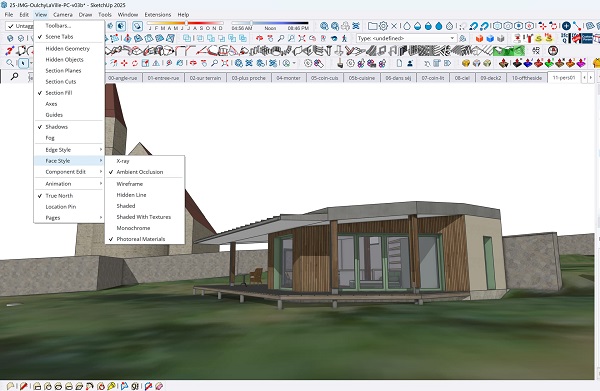
Visual Realism: The addition of photorealistic materials and environment lighting makes models look much richer without needing heavy external render engines.
-
Workflow Efficiency: Many of the changes (extension migration, better IFC/Revit handling, scene-tag improvements) reduce friction and repetitive manual work.
-
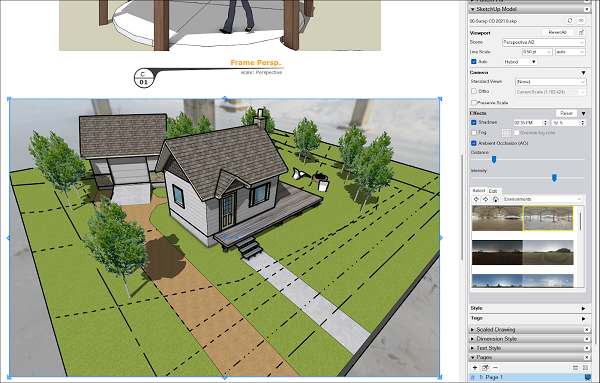
Better Documentation via LayOut: More consistency between 3D modeling and 2D output; fewer jumps between tools and better fidelity in the final documentation.
Who Gains the Most from Upgrading
SketchUp Pro 2026 is especially beneficial for:
- Architects and interior designers who need quick, high-quality visualizations and smoother documentation (2D/3D).
- BIM/construction professionals using IFC, Revit, etc., are seeking better data fidelity across platforms.
- Teams collaborating on projects that need consistency between models, LayOut documentation, and asset libraries.
- Anyone interested in reducing reliance on external rendering tools by using SketchUp’s built-in rendering improvements.
Features Of SketchUp Pro 2026
| Feature | What’s Improved / Added |
|---|---|
| Photorealistic Materials (PBR) | Materials now support physically based rendering (metalness, roughness, ambient occlusion, etc.), resulting in better reactions to lighting and environments. |
| Environments Panel | You can use 360° HDRI or EXR images as background and lighting sources (“sky domes”) for more realistic rendering. |
| Generate Textures | AI-assisted tool to create PBR textures from diffuse or sample images. Helps fill in missing texture details more easily. |
| Improved Interoperability (IFC, Revit, etc.) | Better import/export fidelity with IFC files, more accurate class recognition, smaller file sizes, and improved Revit importer UI. |
| Enhanced LayOut Tools | LayOut now shows photoreal materials and environments in viewports; improved tools like Move, Rotate, Scale work more like SketchUp; better exporting/printing; new Zoom Window tool. |
| Extension Migrator | Helps migrate/transfer plugins/extensions from previous versions to SketchUp 2026 more easily. |
| Scenes & Tagging Improvements | You can now apply tags to scenes (visibility settings), better scene-tag management. |
| Reminders & Asset Management | The software now reminds you to purge unused assets when saving, helping keep file sizes down. |
Limitations / What to Be Aware Of
- The Style Builder application is no longer included/supported. If you relied on custom style lines from that, you’ll need alternative workflows.
- Large or complex models still can face performance issues. While improvements have been made, very high-polygon scenes or huge datasets may require optimization.
- Subscription pricing has been updated (effective July 2, 2026) for various plans (Pro, Studio, Go). Users will want to check how their plan is affected.
Password for file: “123“