Stardock Fences 6.20 is a desktop-organization utility for Windows. It helps you keep your desktop clean and organized by grouping icons, files, shortcuts, and folders into customizable, movable “fences” (shaded areas) rather than letting icons scatter randomly across the desktop.
Stardock Fences 6.20 Description
Stardock Fences is a clean, flexible, and powerful way to manage a Windows desktop, especially when you have many icons, shortcuts, or project-based workflows. By providing fences, automation, and customization, it helps keep the desktop tidy, organized, and productivity-friendly.
Download Stardock Fences 6 is a solution to these problems. We can place a large number of icons in different categories. Hide items we don’t need at any time. Move icons from one category to another and perform various other tasks. Fences will have separate transparency capabilities. For example, you can set them to become transparent when the mouse moves over the fence and fade when it moves away from them again.
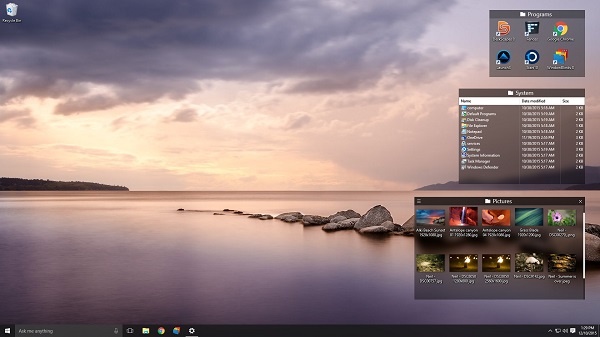
This will make your desktop always look quiet and tidy. Some Windows programs, despite their small size, are extremely useful for Windows users. Stardock Fences is also one of those programs that seem essential for every user.
Features For Stardock Fences 6.20

-
Create Fences (icon groups) — you can draw fenced (shaded) areas on your desktop, give them names (e.g. “Work”, “Games”, “Documents”), and drag relevant shortcuts/files into them. This helps visually organize your desktop.
-
Automatic icon sorting — you can define rules so that new icons (apps, shortcuts, files) are automatically placed into appropriate fence groups (e.g., by file type, name, date, etc.).
-
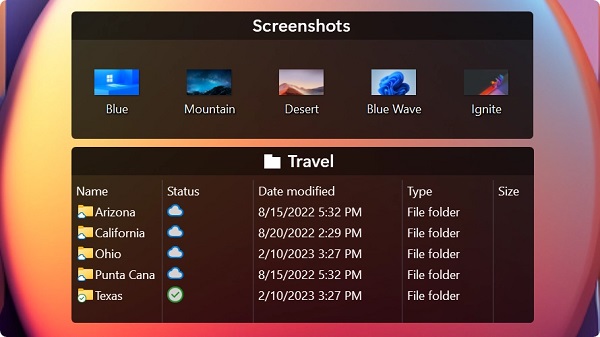
Folder Portals — a special type of fence that mirrors a folder on your PC: e.g. rather than a static icon, you can see the contents of a folder (Documents, Downloads, etc.) directly on the desktop inside a fence, for quick access.
-
Desktop Pages / Multiple Workspaces — you can create multiple “pages” of fences and switch between them (e.g., one page for work, another for personal, another for games), reducing clutter and making context-based organization simpler.
-
Quick-hide / Clean-up with double-click — double-clicking a space on the desktop hides or shows all icons and fences, letting you instantly clean up the desktop view (useful before presentations, screengrabs, or just to reduce clutter temporarily).
-
Rolling up fences — you can collapse (“roll up”) a fence so that only its title bar remains, saving space while keeping items accessible.
-
Customizable look & behavior — fences can be resized, moved, recolored, transparency adjusted, and personalized to match your workflow or aesthetic preferences.
-
“Peek” feature — a hotkey (e.g. Windows + Space) to quickly bring fences to the front — useful when you’re working in another app but need to access desktop shortcuts or files without minimizing everything.
System requirements:
- Fences 3: Windows 10/8/7
- Fences 4: Windows 11/10
Password For File: “123 “