Winxvideo AI 4.4 is an all-in-one AI-powered media enhancement toolkit developed by Digiarty Software, Inc.. It is designed to enhance, convert, compress, record, and edit videos and images using machine-learning models and GPU acceleration.
Winxvideo AI 4.4 Description
In simple terms, if you have low-resolution videos, shaky footage, old photos, or need to convert formats / compress large files, Winxvideo AI aims to provide a unified solution. Compressing and converting image and video formats, recording and editing 4K/8K/HDR videos smoothly and efficiently are among the features provided in Winxvideo AI 4.4.
If you do not have sufficient experience and skills in editing your photos and videos and are looking for an artificial intelligence tool to automatically make these changes, Winxvideo AI will be a good choice for you, with the help of which you can make professional edits without having a background.
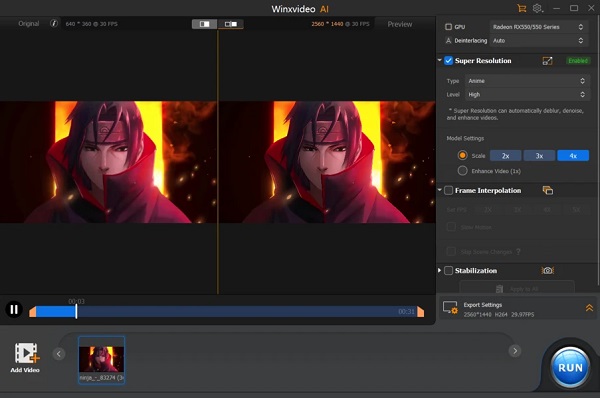
In summary, WinXVideo AI version 4.4 is a strong and versatile media enhancement suite that leans heavily on modern AI models to improve video and image quality, convert formats, compress files, and stabilize footage. For many users with quality improvement needs, it offers a compelling speed + convenience advantage. However, if you require ultra-professional film-grade results (e.g., Hollywood VFX, advanced color grading, motion graphics), or you operate on very limited hardware, you may need to evaluate how it meets your specific demands.
Features of Winxvideo AI 4.4
- AI Video Enhancement / Super Resolution: Upscaling low-quality videos (e.g., 480p or 720p) to HD/4K or even 8K, using AI models to add detail, reduce noise, and remove blur.
- AI Stabilization & Frame Interpolation: Stabilize shaky camera footage (e.g., handheld, drone, GoPro) and increase frame-rate (e.g., from 24/30fps to 60/120/240fps) for smoother motion.
- Image Enhancement / Photo Restoration: Low-resolution images or old photos can be enhanced, noise removed, faces sharpened, B&W colorized, and upscaled to high resolution (4K/8K/10K) in some cases.
- Video Conversion / Format Support: Supports a large number of input formats and converts to many output formats; full GPU-accelerated conversion of 4K/8K content for sharing or archiving.
- Compression / Recording / Editing Tools: Includes video compression (reduce size up to ~90%), screen recording, basic editing (trim, crop, merge), and batch processing of files.
- Full GPU Acceleration: The software claims very high performance boosts (e.g., version 4.0 reported up to 40-80% faster enhancements vs previous versions) thanks to optimized AI models and hardware acceleration.
System requirements:
- Operating Systems:
Windows 7/8/10/11 - GPU
- APIs for GPU Computing: Vulkan ≥ 1.2.x, OpenCL ≥ 1.0.
- NVIDIA: Quadro 410 or higher, GeForce GT 630 or higher, GeForce GTX 645 or higher
- Intel: Intel® UHD Graphics 620 (WHL GT2) or higher, Graphics 510 or higher.
- AMD: AMD Radeon RX550 series or higher.
Password For File ” 123 “