Ashampoo Photo Commander 19 is a very capable and comprehensive tool, blending photo management, editing, and presentation.
Ashampoo Photo Commander 19.0 Description
It’s especially strong in its versatility; you can do quick fixes, serious editing, organize large libraries, and also create creative outputs (like collages or slideshows) all in one place. Its new focus on security (encryption, autosave) and modern formats (WEBP, RAW) makes this version particularly relevant today.
Ashampoo Photo Commander software for PC is able to make your images more beautiful and noticeable by automatically correcting the color. On the other hand, the image organization capabilities can be done well with the help of this software.
This means that you can manage your desired images in different categories depending on your needs. On the other hand, with the help of Ashampoo Photo Commander 19, you can create sliders for your photos to display your images better than before. The image customization capabilities will be well in your hands.
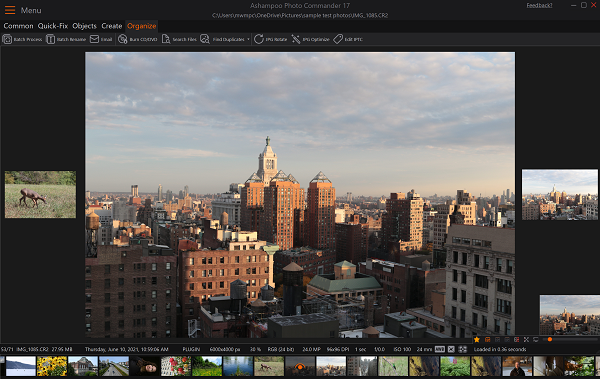
Features Of Ashampoo Photo Commander 19.0
- Security & Stability
- Automatic encryption of its database, backups, and even registry entries.
- Optional screenshot protection to prevent other programs from capturing its interface.
- Autosave + crash reporter helps you recover work and report issues.
- Better File & Drive Handling
- Detects external drives (USB sticks, external HDDs) automatically when plugged in.
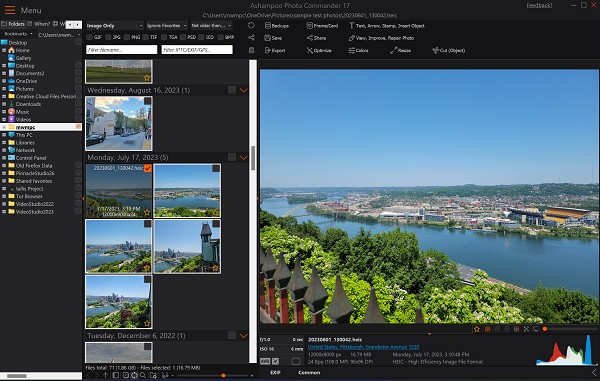
- New “Where? / When?” view — lets you see how many files are in each date or location “bucket” for a quick overview.
- Duplicate detection: uses four-way fingerprint technology to find identical or very similar photos.
- Modern Format Support
- Supports WEBP animations (with EXIF & XMP data).
- Updated RAW plugin for modern digital cameras.
- Improved GIF decoder and support for newer video codecs.
- ADF scanning support for Canon Pro scanners.
- Photo Editing
- Automatic image enhancement: color correction, noise reduction, red-eye removal, etc.
- Manual editing tools: cropping, perspective adjustment, clone / in-paint tools, tonal correction (curves), and more.
- Effects: many built-in effects, and you can work with them at the pixel level (effect pen, etc.).
- Batch Processing
- Handle entire folders: resize, convert formats, add watermarks, rotate, and more in batch.
- Save a lot of time when working on large collections.
- Creative Presentations
- Create 4K slideshows with transitions + background music.
- Build collages, greeting cards, and calendars using built-in templates.
- Presentation mode: you can present on one screen (e.g., via projector) while controlling from another. Metadata & Geotagging
- View and edit EXIF, IPTC, and XMP metadata.
- Geotagging: add/edit GPS coordinates; even view photos on Google Maps.
- Smart grouping/sorting: by date, location, file name, etc.
- Rescue / Creative Features
- Create panoramas.
- Auto-fix for overexposed or washed-out images.
System Requirements
- Windows® 10, Windows® 8 / 8.1, Windows® 7
- Recommended Hardware
- Any computer that supports the above operating systems.
Password for file: “123“